![[XFSkins] Foxy - XenForo Akıllı Forum Asistanı](/data/resource_icons/0/56.jpg?1781214714)
Eklenti/Tema sürümü
:
2.0.0
Uyumlu XF sürümü
2.3.10
Kurulumlar
0
Görüntüleme
7
Yayınlanma tarihi
Son güncelleme
İndirmeler
0
Kısa açıklama
XenForo 2.3 için AI sohbet, otomatik ipucu ve yönetici komut asistanı.
Özellikler
- Desteklenen
- Veritabanı değişiklikleri
- Sınıf uzantıları kullanıyor
- Olay dinleyicileri kullanıyor
- Otomatik şablon
- Ek dosyalar
- Çeviriler
- Uyumlu XF Sürümleri
- Xenforo 2.3.X
-
[XFSkins] Foxy, XenForo 2.3 forumları için geliştirilen yapay zeka destekli akıllı forum asistanıdır. Kullanıcılarınıza forum içinde daha hızlı yardım eder, bağlama göre ipuçları sunar ve yöneticiler için doğal dil ile görev çalıştırabilen pratik bir asistan katmanı sağlar.
Foxy; sohbet asistanı, otomatik ipucu üretimi, derin kullanıcı tanıma, konuşma belleği ve çoklu AI API desteğini tek bir XenForo eklentisinde birleştirir. Amaç basit: üyelerin forumu daha rahat kullanmasını sağlamak, yeni kullanıcıların alışma sürecini hızlandırmak ve yönetici tarafındaki tekrar eden işleri daha akıcı hale getirmek.
Öne çıkan özellikler
- AI destekli sohbet asistanı: Kullanıcılar Foxy’ye “Nasıl mesaj atarım?”, “Profilimi nasıl düzenlerim?” veya “Bildirimler nasıl çalışır?” gibi sorular sorabilir.
- Çoklu yapay zeka API desteği: Yalnızca Claude ile sınırlı değildir; OpenAI ve uyumlu AI sağlayıcılarıyla genişletilebilir yapıdadır.
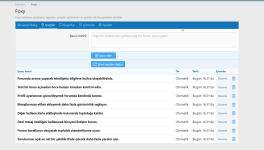
- Akıllı ipuçları: Belirlenen aralıklarla forum kullanımı, profil, mesajlaşma, bildirimler ve keşif odaklı yararlı ipuçları gösterir.
- Otomatik ipucu üretimi: Varsayılan olarak 6 saatte bir AI ile yeni forum ipuçları üretilebilir. Otomatik ipuçları yenilenirken manuel eklenen ipuçları korunur.
- Konuşma belleği: Foxy son 5 konuşma turunu hatırlayarak daha bağlamsal ve doğal cevaplar verir.
- Derin kullanıcı tanıma: Mesaj sayısı, konu geçmişi, beğeniler, üye grupları, profil bilgileri, takipçi durumu ve aktif forumlar gibi verilerle daha kişisel öneriler sunar.
- Bağlamsal yardım: Konu okurken, forum listesinde, profil sayfasında, ayarlar ekranında veya arama sayfasında bulunduğunuz yere göre farklı öneriler üretir.
- Yönetici komut sistemi: Yöneticiler doğal Türkçe komutlarla konu açma, cevap yazma, mesaj silme, konu başlığı düzenleme, uyarı gönderme ve kullanıcı yasaklama gibi işlemler başlatabilir.
- Dark mode ve mobil uyum: XenForo temasıyla uyumlu, karanlık modda okunabilir ve mobil cihazlarda kullanılabilir arayüz sunar.
- Phrase tabanlı arayüz: Tüm arayüz metinleri phrase yapısını kullanır. Varsayılan dil İngilizcedir ve kolayca yerelleştirilebilir.
v2.0 ile gelen yenilikler
- Yönetici panelinden görev geçmişi izlenebilen admin komut sistemi eklendi.
- Foxy artık önceki mesajları hatırlayarak “Az önce bahsettiğin konu…” gibi bağlamlı konuşmaları sürdürebilir.
- Kullanıcı profili, aktivite geçmişi, ilgi alanları ve başarıları daha kapsamlı analiz edilir.
- AI ile otomatik ipucu üretimi eklendi; manuel ipuçları kalıcı kalır.
- Sohbet penceresi, hazır sorular ve dark mode görünümü iyileştirildi.
- Chat başlığı sadeleştirildi ve public tarafta yalnızca “Foxy” olarak gösterilir.
Yönetici komut örnekleri
- “Teknoloji forumunda yapay zeka hakkında yeni bir konu aç”
- “35 numaralı konuya teşekkür mesajı yaz”
- “kullaniciadi adlı üyeyi 7 günlüğüne yasakla, sebep: spam”
- “45 numaralı mesajı sil”
- “123 numaralı konunun başlığını şu şekilde düzenle: ...”
- “kullaniciadi’ya forum kuralları hakkında uyarı gönder”
Kullanıcılar Foxy’ye neler sorabilir?
- “Nasıl mesaj atarım?”
- “Profil resmimi nasıl değiştiririm?”
- “Bildirimlerimi nasıl ayarlarım?”
- “Özel mesaj nasıl gönderilir?”
- “Avatar nasıl eklenir?”
- “İmza nasıl oluşturulur?”
- “Benim hakkımda ne biliyorsun?”
- “Bana uygun forum önerir misin?”
Kurulum
- İndirdiğiniz paketin içeriğini XenForo ana dizinine yükleyin.
- Admin CP → Add-ons alanından [XFSkins] Foxy eklentisini kurun veya yükseltin.
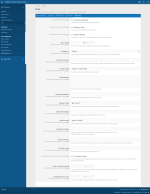
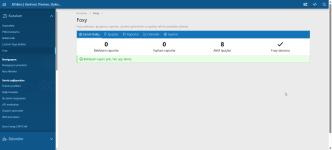
- Foxy Dashboard içindeki Settings sekmesinden AI sağlayıcınızı, API anahtarınızı ve ipucu ayarlarınızı yapılandırın.
- Yönetici komut sistemini kullanacaksanız izinleri ve güvenlik sınırlarını kontrol edin.
- Public tarafta sağ alt köşedeki Foxy asistanını test edin.
Gereksinimler
- XenForo 2.3.0 veya üzeri
- AI cevapları için desteklenen bir yapay zeka API anahtarı
- Yönetici komutları için uygun admin izinleri
Kimler için uygun?
Foxy; yeni üye deneyimini güçlendirmek, forum içi destek yükünü azaltmak, kullanıcıları doğru alanlara yönlendirmek ve XenForo üzerinde AI destekli daha modern bir yardım deneyimi sunmak isteyen topluluklar için uygundur.
XenForo yapay zeka eklentisi, forum asistanı, otomatik ipucu sistemi, AI chat bot ve yönetici komut asistanı arayanlar için Foxy kapsamlı ve pratik bir çözümdür. -
[XFSkins] Foxy is a smart forum assistant for XenForo, designed to help your members use the community more easily while giving administrators powerful AI-assisted tools from a single native control panel.
Foxy appears on the public side as a friendly assistant, answers user questions, gives contextual forum tips, understands where the visitor is on the site, and supports multiple AI providers such as Claude, OpenAI, Gemini and compatible API services.
What does Foxy do?
Smart Forum Tips
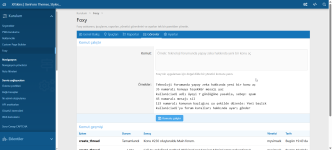
Foxy can display helpful tips at defined intervals to guide users through the forum experience. It can show welcome messages for new members, time-based suggestions, activity-based recommendations and personalized guidance based on the user’s forum behavior.
AI Chat Assistant
Members can click Foxy and ask questions such as:
- How do I create a post?
- How do I edit my profile?
- How do notifications work?
- How do I send a private message?
- How do I change my avatar?
- How do I create a signature?
Foxy answers in a clear and helpful way using the configured AI provider. If no provider is configured, it can still fall back to built-in local answers.
Context-Aware Help
Foxy understands the page context and can offer more relevant help depending on where the user is:
- While viewing a thread, it can explain how to reply or follow the discussion.
- On forum lists, it can suggest areas the user may want to explore.
- On profile pages, it can explain profile-related features.
- On settings pages, it can guide users through account configuration.
- On search pages, it can provide better search tips.
What’s new in version 2.0?
Admin Command System
Administrators can give Foxy natural-language tasks from the admin panel, such as creating threads, replying to topics, editing thread titles, deleting posts, banning users or sending warnings.
Example commands:
- Create a detailed topic about XenForo add-on development steps.
- Reply to thread 35 with a thank-you message.
- Ban the user named exampleuser for 7 days, reason: spam.
- Delete post 45.
- Change the title of thread 123 to: ...
- Send a warning to exampleuser about the forum rules.
All admin tasks are recorded in the admin panel task history. Foxy also checks the acting administrator’s permissions before executing sensitive actions.
Conversation Memory
Foxy remembers the latest conversation context and sends the last 5 conversation turns to the AI provider. This allows more natural follow-up questions such as “Can you explain the topic you just mentioned?”
Deep User Understanding
Foxy can understand useful public and forum-related user data, including:
- Name, location, biography and website
- User groups, title and rank
- Total messages, threads, reactions and trophy points
- Posting activity and recent activity
- Followers and following count
- Most active forums
- Recent threads and top-liked posts
- Bookmarks and custom profile fields
This allows Foxy to provide more personalized and relevant help.
Automatic AI Tip Generation
Administrators can set an automatic tip generation interval. By default, Foxy can generate new forum tips every 6 hours using the configured AI provider. Automatically generated tips are refreshed, while manually added tips remain permanent.
Key Features
- AI-powered forum assistant
- Multiple AI provider support
- Claude, OpenAI, Gemini and compatible API support
- Personalized user guidance
- Context-aware answers
- Admin command system
- Task history for administrator actions
- Conversation memory
- Automatic forum tip generation
- Native XenForo admin interface
- Phrase-based interface with English defaults
- Dark mode support
- Mobile-friendly public chat interface
- Fallback local answers when AI is not configured
Why use Foxy?
Foxy helps reduce repeated support questions, improves the onboarding experience for new members and makes your forum feel more interactive. It gives members instant help while giving administrators a practical AI-powered workflow for common forum tasks.
Whether you run a support community, discussion forum, niche community or resource-based site, Foxy adds a modern assistant experience without breaking the native XenForo look and feel.
Compatibility
- XenForo 2.3 compatible
- Designed as a native XenForo add-on
- Add-on ID: XFSkins/Foxy
- Version: 2.0.0
Installation
Upload the add-on files, install [XFSkins] Foxy from the XenForo admin panel, configure your preferred AI provider, and enable the assistant from the Foxy dashboard.
Once enabled, Foxy will be available on the public side of your forum.
-
 chrome_7AMgYu8tSt.png
 -
 chrome_RNIUacLA3E.png
 -
 chrome_klgGWIULAF.png
 -
 chrome_oSN67sQsmz.png
 -
 chrome_vbAI22TUgX.png
 -
 xfskins_foxy-resource-banner.png
 -
 foxy-resource-banner-v4-en.png

![[XFSkins] Advanced Statistics & Live Activity Timeline - XenForo canlı forum istatistikleri](/data/resource_icons/0/57.jpg?1781220002)
![[XFSkins] Temporary Email Blocker](/data/resource_icons/0/54.jpg?1780949441)

![[XFSkins] Internal Linking - Konu İçi Otomatik Dahili Linkleme](/data/resource_icons/0/36.jpg?1777216777)
![[XFSkins] Thread Navigator - XenForo için gelişmiş sıralama ve filtreleme](/data/resource_icons/0/51.jpg?1780607636)